
Before you register a number on the WhatsApp Business API, check that you have the right phone number, a Meta business portfolio, a display name Meta will approve and customers who agreed to hear from you. This checklist covers each one, and our team can help with any of them.
Check off these five foundational prerequisites before launching Meta Embedded Signup in CampaigningTool:
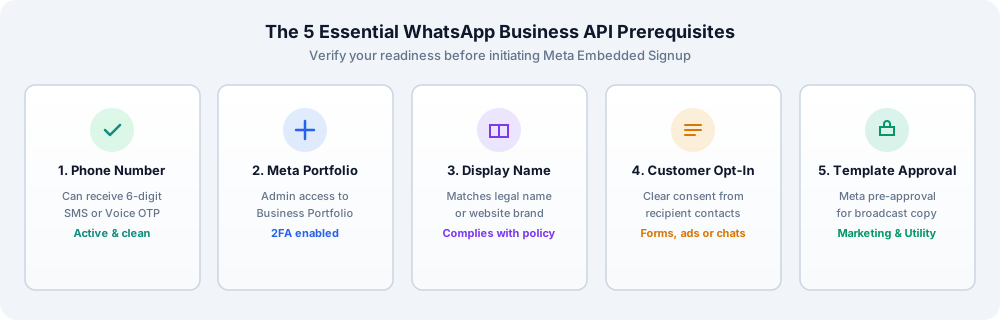
To send and receive messages on the WhatsApp Cloud API, you need a dedicated phone number that satisfies Meta's technical prerequisites:
The WhatsApp Business API is managed through Meta's enterprise infrastructure:
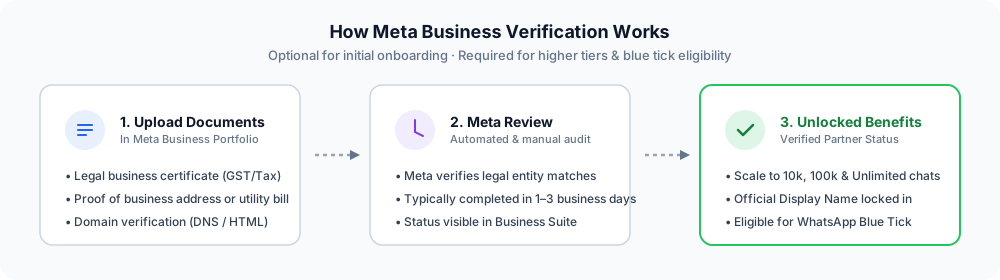
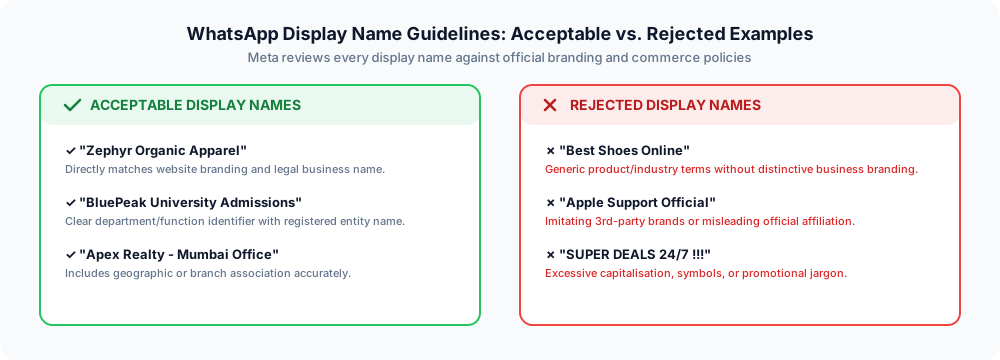
Your display name is the name customers see in WhatsApp chats and headers:
You must have permission to message each customer, for example through a tick box on a website checkout form, a chat they initiated, or a Click-to-WhatsApp ad.
Messages that start a conversation (outbound broadcasts, utility alerts, and marketing offers) must use a template approved by Meta. Explore 100+ Meta-approved examples in our Template Library.
Meta limits how many unique customers you can initiate conversations with per 24-hour window, scaling automatically from 250 → 1,000 → 10,000 → 100,000 to Unlimited as your sending volume and quality rating grow.
Poorly received messages (marked by high blocks or spam reports) can lower your quality rating and lead to temporary messaging limits. Always ensure your audience has explicitly opted in and provide an easy opt-out mechanism.
Meta's Business Messaging Policy states that you should not ask customers to share full-length payment card numbers, financial account numbers, personal ID card numbers, or other sensitive personal identifiers in chat. Specific categories, such as healthcare providers, are subject to additional data privacy rules.
Meta's Commerce Policy also bans transactions and promotions for certain products, such as weapons, gambling, adult content, and unregulated health supplements. Review both policies before creating campaign templates.
Meta charges per template conversation based on the recipient's country and template category (Marketing, Utility, Authentication, or Service). You pay your CampaigningTool software subscription separately, and Meta charges are passed through at official rates without markup.
You can attach a direct credit card or payment method inside your Meta WhatsApp Business Account for conversation credits. Transparent tier pricing is available on our Pricing page.
Our solutions team can check your number eligibility, assist with Meta business portfolio verification, help craft approved display names, and guide you through seamless setup. If you want a verified green/blue checkmark, see our guide on WhatsApp blue tick verification.
Get Free Setup AssistanceAnswers to common questions about onboarding prerequisites, phone rules, and Meta verification.
You need a phone number that can receive a verification SMS or call, admin access to a Meta business portfolio, a display name that matches your business, and customers who have agreed to receive your messages.
Sometimes. It must be able to receive the verification call or SMS, and Meta can still reject it, so test before you rely on it.
Often yes. See how to use your existing number on the WhatsApp API.
You can start without it, but verification raises your limits and is needed for some features, such as the blue tick.
Usually your business registration documents and proof of your business address or website. Meta decides what it accepts.
The name should match your legal business name or the public name on your website, and shouldn't imitate another brand.
Yes. You need permission to message each customer, and every message should make it easy to opt out.
Setting up API requirements incurs no extra fee from Meta, while outbound messages are billed by Meta based on their category. See the pricing page for current plans.
Talk to our team, or start a 7-day free trial and connect your number in minutes.