Already use the WhatsApp Business app? You don’t have to give it up to run campaigns and a team inbox. With coexistence, CampaigningTool connects your existing WhatsApp Business app number to the official Cloud API. You keep answering customers one-to-one in the app, and your team uses CampaigningTool for bulk campaigns, automation and shared replies, with messages kept in sync between both.
Keep the simplicity of your mobile phone app while unlocking enterprise WhatsApp Cloud API powers.
Businesses can onboard with their existing WhatsApp Business app account and phone number, and still message customers one-to-one in the app. No need to buy a separate number or migrate entirely away from your phone.
Send approved template campaigns, schedule drips and use the AI agent from CampaigningTool, without changing the number customers know. See bulk broadcasts for reach at scale.
Messages sent and received are mirrored between the Cloud API and the app, and contacts and recent chat history can be synchronized. Your phone and team inbox stay updated simultaneously.
Follow Meta's official Embedded Signup flow to link your phone app and Cloud API in minutes.
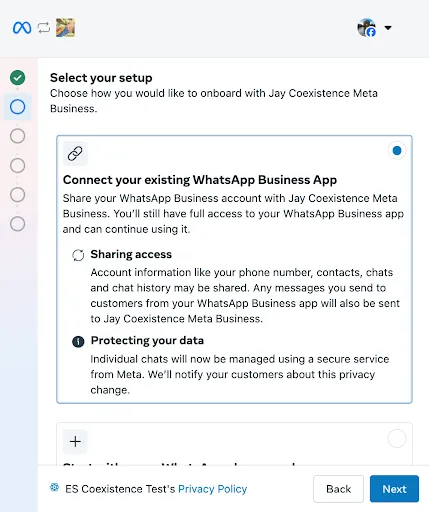
Start in CampaigningTool and choose to connect your existing WhatsApp Business app number via Meta Embedded Signup.
Enter your number. WhatsApp shows a verification code, which you copy to your clipboard.
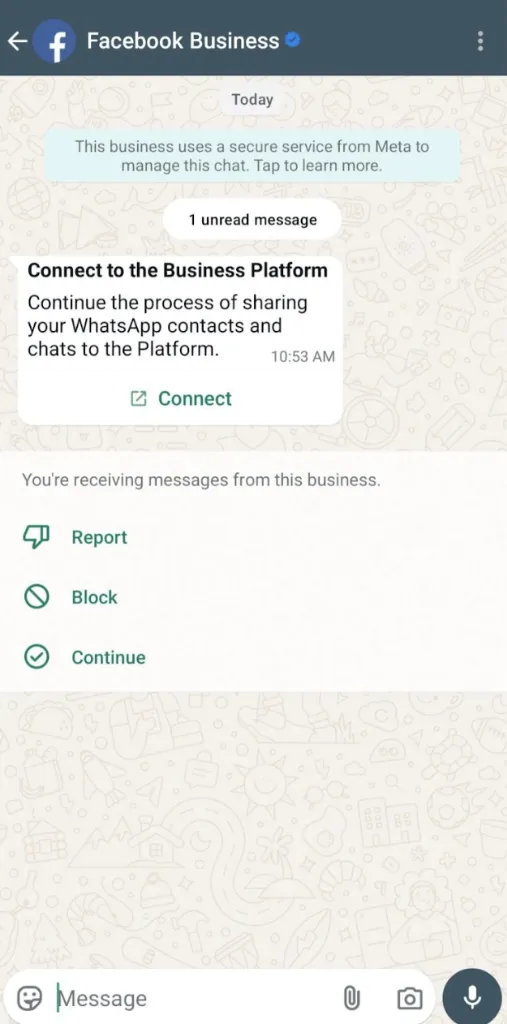
Open your WhatsApp Business app. You’ll receive a message from the official Facebook Business Account. Tap Connect, then Connect to the Business Platform.
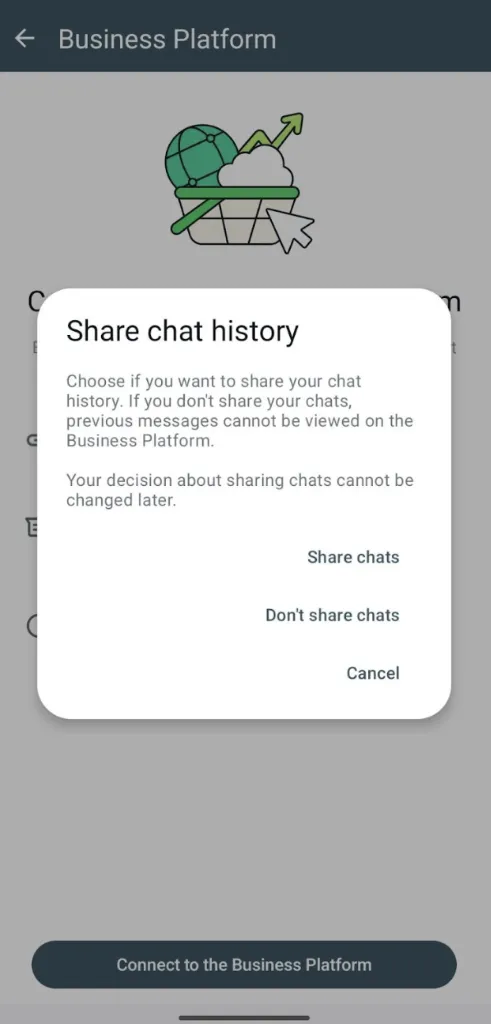
Choose whether to share chat history. Tap Confirm in the app to give CampaigningTool the option to import your chat history.
Paste the code and finish the signup on the CampaigningTool onboarding screen.
Wait for the sync. The partner has 24 hours to synchronize history, and it can take several minutes. Keep the WhatsApp Business app open while it runs.
Choose "Connect your existing WhatsApp Business App" in Meta Embedded Signup.
Receive prompt from Facebook Business in WhatsApp and tap "Connect".
Confirm permission to mirror your past 6 months of 1-to-1 chats.
Meta deprecated Embedded Signup v2 on October 15, 2026. CampaigningTool’s coexistence onboarding operates natively on Meta’s official Version 4 framework, guaranteeing continuous uptime, official compliance, and seamless chat synchronization.
Ensure your phone, account, and business portfolio meet Meta’s coexistence requirements.
Detailed breakdown of features supported on the phone app versus the Cloud API under coexistence.
You can link up to four companion devices to the Business app, except WhatsApp for Windows and WatchOS-type wearables. When you connect to the API, all linked devices are unlinked, and you can then link the supported ones again.
Keep your primary phone active. Meta disconnects the API link in some cases, for example if the primary device is inactive for about 14 days, a linked device for about 30 days, the number is registered on the regular WhatsApp app, or you re-register on a new device.
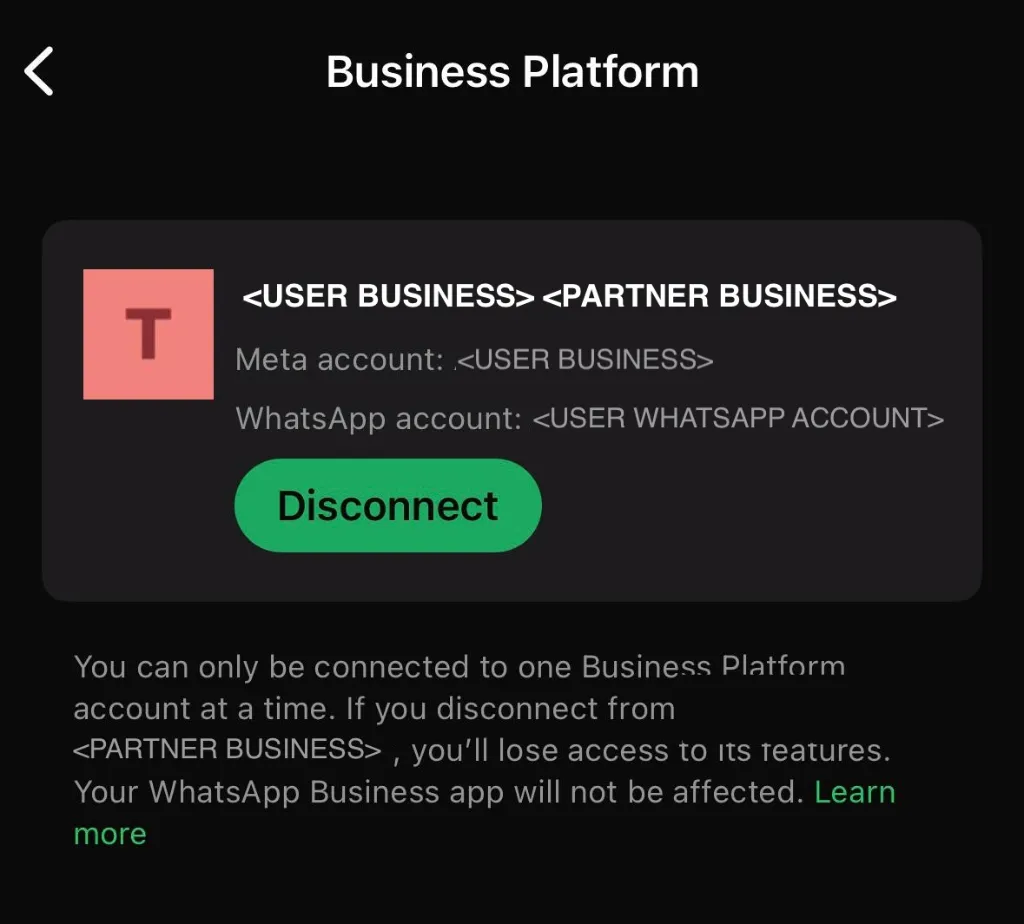
If you want to disconnect yourself, open the WhatsApp Business app, go to Settings → Account → Business Platform, and tap Disconnect Account.
How conversation windows and Meta API pricing function alongside free mobile app chats.
See pricing for your CampaigningTool plan details and conversation credits.
Understanding throughput rates for numbers paired between the mobile app and Cloud API.
Numbers used on both the Business app and the Cloud API have a fixed throughput of 20 messages per second, to stay compatible with the app. That is plenty for most campaigns (10,000 messages take under 10 minutes), but it’s lower than the default for API-only numbers. Meta’s daily messaging limits still apply on top of it.
Choose the setup that matches your team’s messaging volume and operational workflow.
Use coexistence if you already use the Business app, want to keep the number and the app, and are happy with the limits above.
Use an API-only number if you want the highest throughput, don’t need the app, or your number is on the regular WhatsApp app (switch to the Business app first, or move the number as explained in our existing number guide).
Businesses that bridge everyday customer conversations with automated broadcasts.
Small and growing shops, clinics, coaching institutes and agencies that already answer customers in the Business app use coexistence to power marketing without losing personal touch.
Take customer enquiries in the app while sending automated abandoned cart recoveries and festive sale broadcasts via API.
WhatsApp for E-CommerceDoctors reply to patient queries from their phone app while receptionist software broadcasts appointment and clinic alerts.
WhatsApp for HealthcareCounselors answer student questions on the phone while sending automated admission notices and fee reminders via API.
WhatsApp for CollegesConnect your existing number, keep your app and start sending campaigns. Try CampaigningTool free for 7 days.
Direct, transparent answers regarding Meta coexistence setup, phone app usage, and API rules.
It’s Meta’s option that lets a number on the WhatsApp Business app also connect to the Cloud API, so you can use the app and a platform like CampaigningTool on the same number.
No. Your app stays active. It must be the WhatsApp Business app, not the regular WhatsApp app.
Chats stay in your app. You can also let CampaigningTool import up to six months of one-to-one history, which doesn’t include group chats.
WhatsApp Business app version 2.24.17 or higher.
No. Broadcast lists are disabled in the app after you connect. Run campaigns from CampaigningTool instead.
No. Messages sent from the Business app stay free. Messages sent through the API follow Meta’s API pricing.
Numbers used on both the app and the API are limited to 20 messages per second, and Meta’s daily messaging limits also apply.
Meta can disconnect the API link if the primary phone is inactive for about 14 days, so keep the Business app in use.
Yes, from the Business app: Settings, Account, Business Platform, then Disconnect Account.
They’re unlinked when you connect, and you can link supported ones again. WhatsApp for Windows isn’t supported.