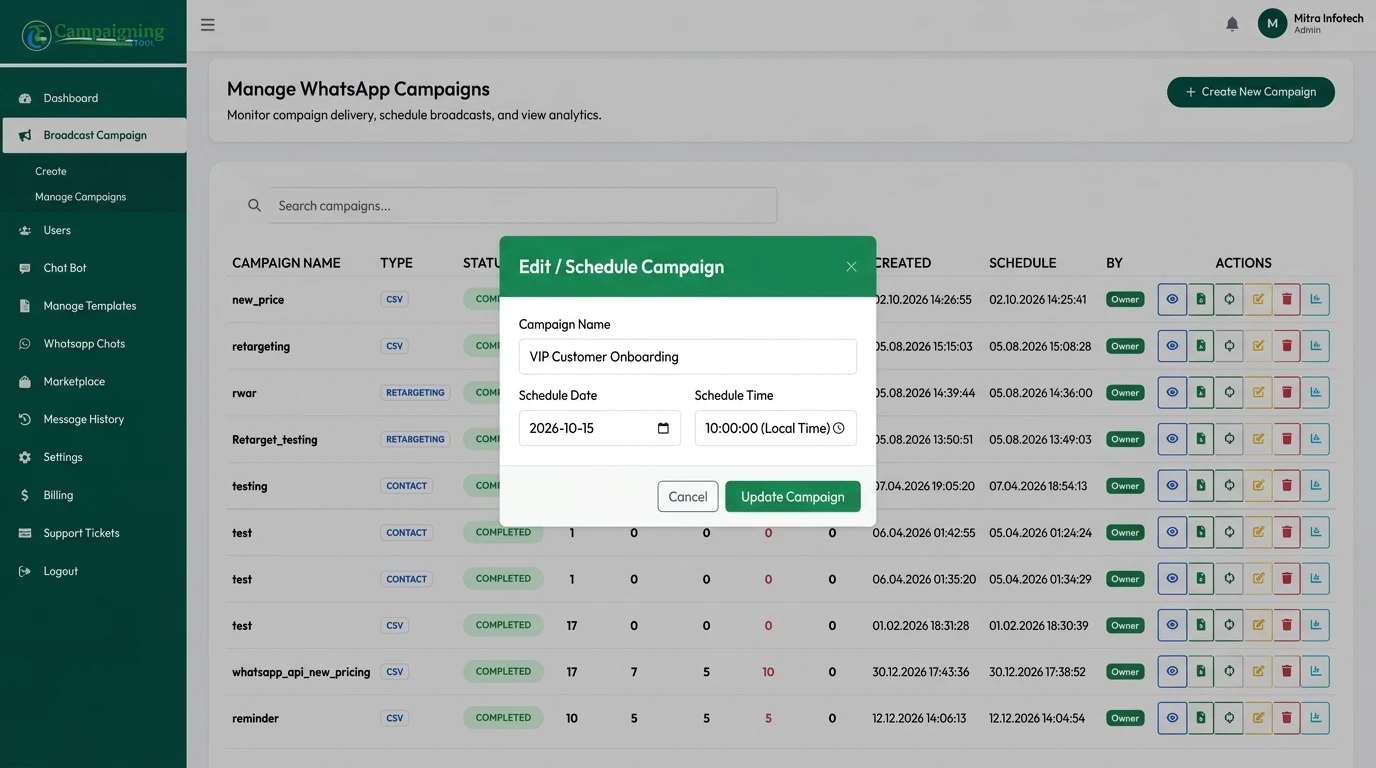
Schedule WhatsApp campaigns for the time your customers are most likely to read them, and set up drip sequences that send a series of messages after a sign-up or purchase. CampaigningTool runs on the official WhatsApp Business API, uses Meta-approved templates and messages only customers who opted in.
Reach opted-in contacts at the right moment across time zones, milestones, and customer onboarding journeys.
Send each contact's message at a local time you choose, such as 10:00 a.m. in their time zone. Eliminate midnight notifications and maximize open rates by respecting recipient waking hours worldwide.
Send greetings and offers on dates in your contact data, to customers who agreed to receive them. Ensure you hold dates of birth lawfully with logged opt-in consent before triggering automated milestone rewards.
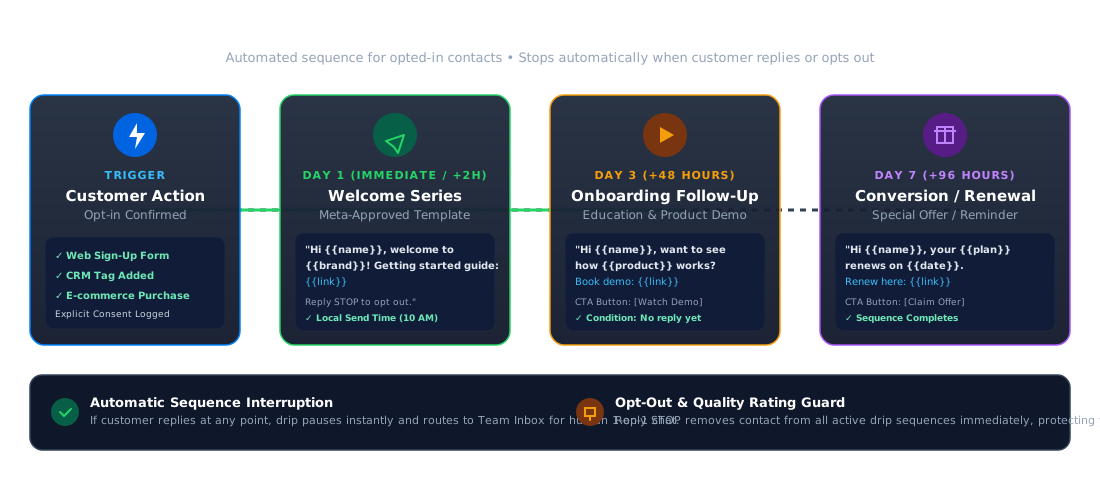
Send a series, for example a welcome guide on day 1, a product demo on day 3 and an offer on day 7, and stop the series when a customer replies or opts out. Keep messages helpful, timely, and conversational.
Set up targeted broadcasts or multi-day drip journeys in four simple, policy-compliant steps. Looking for immediate one-time mass sending instead? See our bulk WhatsApp broadcast software.
Choose your audience, only customers who opted in. Filter by CRM tags, signup dates, or custom attributes.
Pick a Meta-approved template from the template library with personalized parameters.
Set the date and time, or the trigger, such as a sign-up, purchase or birthday, with local time zone delivery.
Track delivery, replies and opt-outs in your dashboard, and add link tracking to see which messages get clicks.
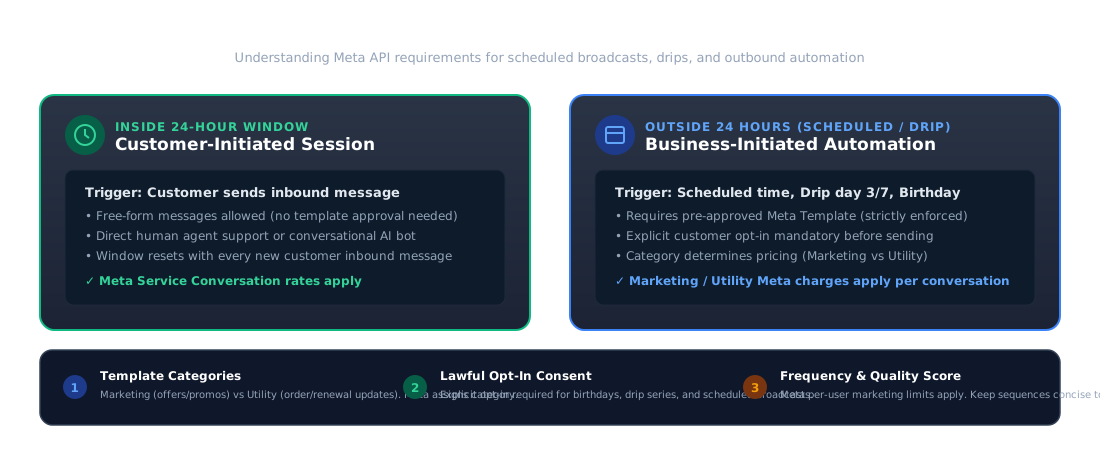
Sending automated and scheduled messages on the official WhatsApp Business API requires adhering to Meta's communication policies and messaging windows.
The 24-Hour Customer Service Window
You can send free-form messages only within 24 hours of a customer's last message. Anything scheduled or sent outside this 24-hour customer service window requires a Meta-approved template.
Templates and Categories
Marketing templates carry Meta charges that are higher than utility ones. Meta automatically decides and enforces the template category during the approval submission process.
Mandatory Customer Opt-In
You need verifiable permission from each customer before sending scheduled messages. Every drip message should also make opting out clear and easy (such as "Reply STOP to opt out").
Frequency and Quality Rating
Too many messages lead to user blocks and a lower phone number quality rating. Meta may also limit how many marketing messages an individual receives. Keep sequences short, relevant, and spaced out.
Need full technical guidelines? See WhatsApp API requirements.
Practical, copy-ready sequences designed to nurture new sign-ups, guide customer onboarding, and drive recurring renewals. For retail shops and storefronts, see WhatsApp for e-commerce.
{{name}}, welcome to {{brand}}. Here is our guide to getting started: {{link}}.Introduces your brand, delivers essential onboarding resources, and provides clear opt-out compliance.
{{name}}, want to see how {{product}} works? Book a short demo: {{link}}.
Re-engages trial users or new buyers with educational content and interactive product demo invitations.
{{name}}, your {{plan}} renews on {{date}}. Renew here: {{link}}.
Prevents involuntary churn by giving customers advance notice and a direct one-click link to complete their renewal.
Deliver timely reminders and scheduled updates without manual effort.
Vehicle Service Reminders
Schedule automated service due dates and insurance renewals. See Car Dealerships.
Pre-Arrival & Check-Out
Send directions and check-in guides 24h before arrival. See Travel & Hospitality.
EMI & Policy Alerts
Trigger automated payment reminders before due dates. See Finance & Insurance.
SaaS Onboarding Drips
Send feature tips and milestone triggers to new sign-ups. See WhatsApp for SaaS.
Discover how businesses achieve higher conversion rates with scheduled messaging in our customer case studies.
Everything you need to know about scheduling broadcasts, configuring drip sequences, and staying compliant on WhatsApp.
Businesses can schedule WhatsApp campaigns through the WhatsApp Business API with a platform such as CampaigningTool. Messages sent outside the 24-hour customer service window must use a Meta-approved template.
Yes. Choose your audience and template, then set the date and time.
You set a series of templates and the gaps between them, and each contact gets the next message at the right time after a trigger such as sign-up or purchase.
Yes, for messages outside the 24-hour window. Templates must be approved by Meta before you send.
Keep it short and relevant. Too many messages lead to blocks and lower quality, and Meta may limit how many marketing messages one person receives.
Yes, to customers who agreed to receive messages and whose dates you hold lawfully.
Yes, you can choose a local send time for each time zone.
Scheduling a campaign doesn't change what it costs: Meta bills each message by its category (marketing, utility or authentication), not by when it goes out. See the pricing page for current plans.
Pick a template, choose your audience and set the time. Try it free for 7 days.