Meta Ads Native Integration
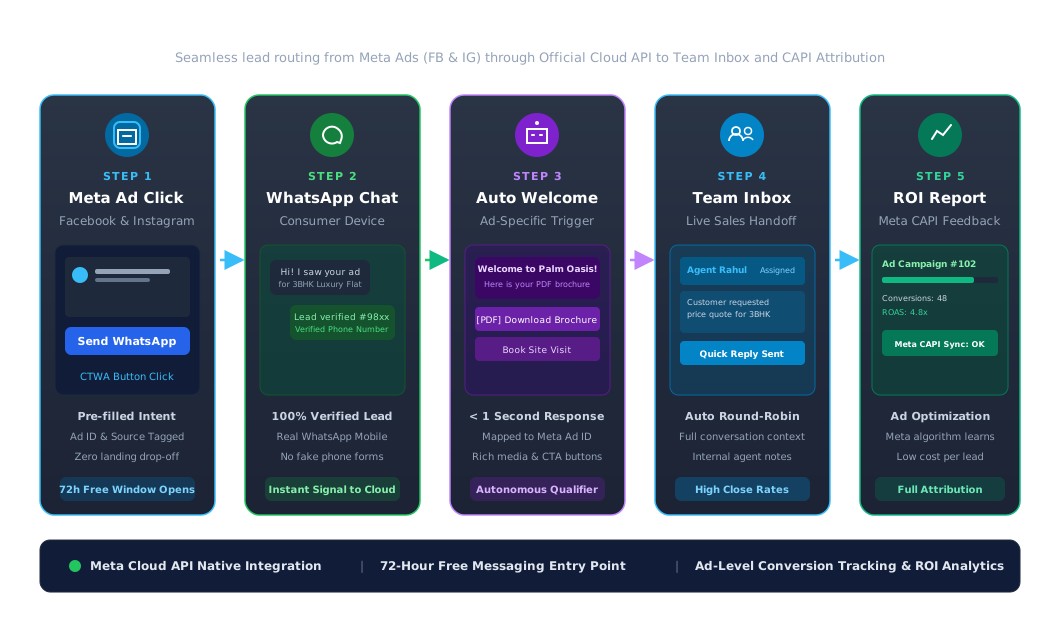
Send your Facebook and Instagram ad clicks straight into a WhatsApp chat. CampaigningTool replies to every new lead instantly on the official Meta Cloud API, sends a welcome message based on the ad they clicked, and helps you see which ads bring real enquiries and sales.
Streamline your Meta ad conversion funnel with direct, automated WhatsApp engagement.
No slow landing pages or forms to abandon. People tap your ad, a WhatsApp chat opens with a pre-filled message, and your reply goes out straight away.
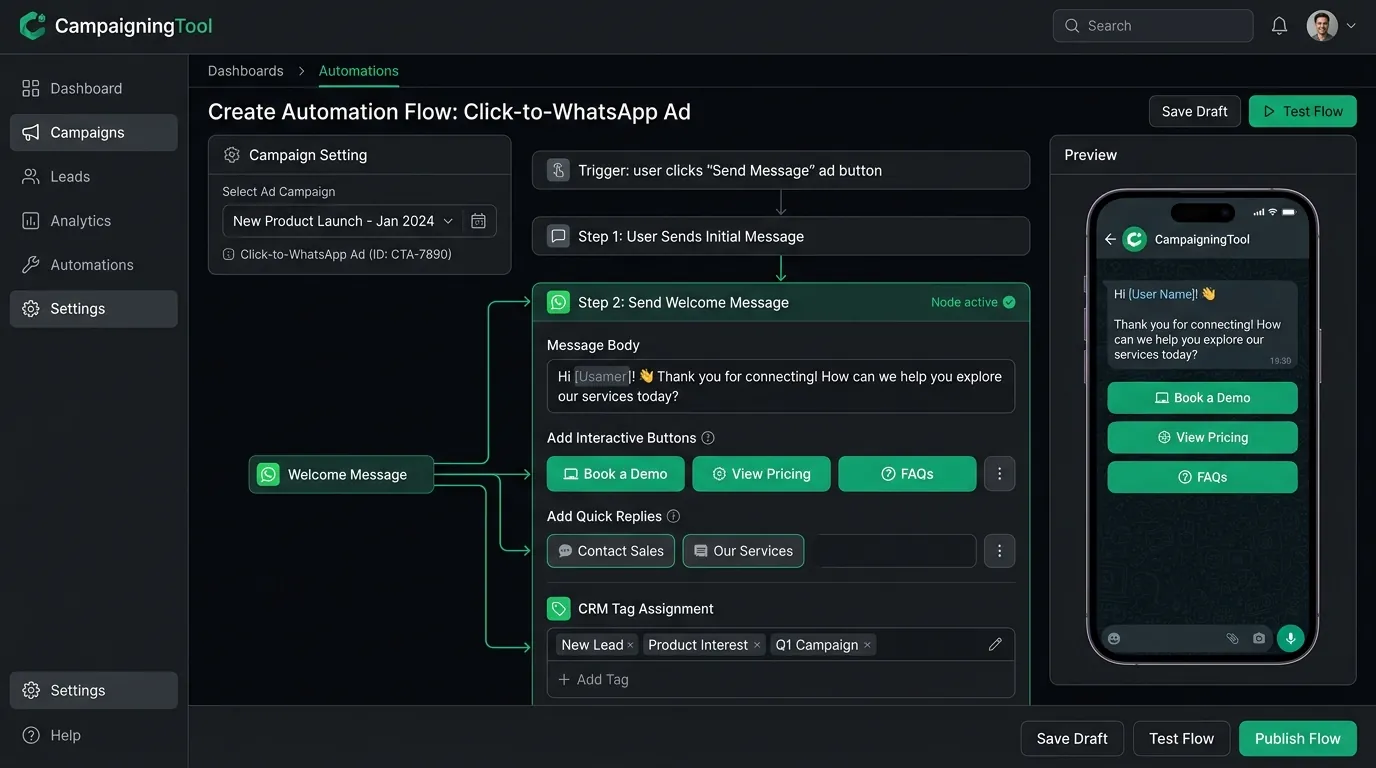
Send a different welcome flow depending on which ad or campaign the customer clicked. Deliver relevant catalogs, brochures, or pricing automatically.
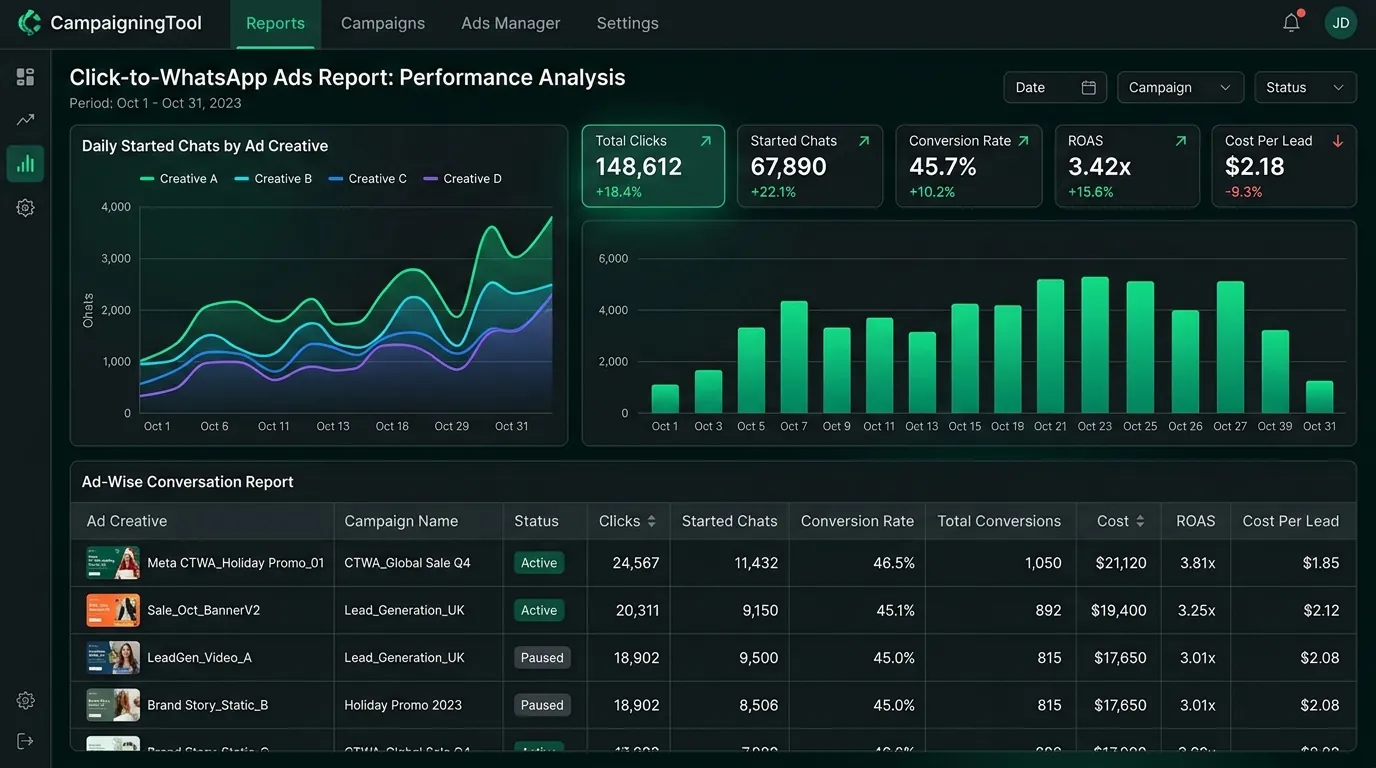
See which ads start conversations and which turn into customers, and send conversion events back to Meta to improve ad delivery.
Four clear steps to turn Facebook and Instagram ad clicks into qualified WhatsApp customers.
Connect your WhatsApp Business number and Meta ad account in CampaigningTool.
Create a Click-to-WhatsApp ad in Meta Ads Manager and choose WhatsApp as the destination.
Set a tailored welcome message for each ad in your CampaigningTool dashboard.
Reply and follow up. Your team or AI agent answers from the shared inbox, and you track results by ad.
Stop guessing which Facebook and Instagram ads produce real revenue. CampaigningTool tags incoming WhatsApp conversations with the originating Meta ad campaign ID, ad set, and creative source.
Understanding Meta's 72-hour free entry point window for Click-to-WhatsApp ads.
When a customer starts a chat from a Click-to-WhatsApp ad, Meta opens a 72-hour free entry point window in which messages to that customer are free, including template messages. This applies to clicks made from the WhatsApp mobile apps on Android and iOS, and you need to reply within 24 hours. Rules and rates change, so check Meta's current pricing page before planning your budget.
High-converting direct messaging campaigns tailored for key industry verticals.
Real Estate
Capture homebuyers and investors from property ads. Instantly send digital brochures, floor plans, and schedule on-site visits directly inside WhatsApp.
Education and Colleges
Turn admission and course promotion ad clicks into student enquiries. Share prospectus PDFs, fee details, and connect applicants to academic counsellors.
E-Commerce & D2C
Route Instagram and Facebook product ad clicks to WhatsApp for instant product consultations, custom sizing recommendations, and 1-click checkout.
Finance and Insurance
Qualify loan applicants and insurance buyers instantly. Collect eligibility details through secure conversational prompts and route leads to licensed advisors.
Healthcare & Clinics
Convert local health checkup and specialized treatment ads into confirmed appointments with automated scheduling and doctor availability checks.
Hotels & Travel Agencies
Turn seasonal holiday and resort ad clicks into booked stays. Share digital brochures, answer room queries, and take reservations directly in chat.
Car Dealerships & Service
Turn new car launch and test drive ad clicks into showroom appointments. Share brochures and walk-around videos instantly in chat.
Common questions about setting up and running Click-to-WhatsApp ads with CampaigningTool.
They are Facebook and Instagram ads with a button that opens a WhatsApp chat with your business instead of a website. The customer taps the ad and starts a conversation with a pre-filled message.
You can run the ads with the WhatsApp Business app, but to reply automatically, assign chats to a team and track results by ad, you need the WhatsApp Business API, which CampaigningTool provides as an official Meta partner.
Connect your Facebook Page and WhatsApp Business number, create an ad in Meta Ads Manager, and choose WhatsApp as the message destination. In CampaigningTool you then set the welcome message for each ad.
Yes. You can set a different automated reply based on the ad or campaign the customer clicked.
When a customer messages you from a Click-to-WhatsApp ad, Meta opens a 72-hour free window for messages to that customer, if you reply within 24 hours. Check Meta's current pricing page for the latest rules.
Yes. You can see which ads start conversations and send conversion events back to Meta to improve ad delivery.
Yes. Your WhatsApp AI agent can reply 24/7 and hand over to your team when a person is needed.
Ad spend is paid directly to Meta, and chats started from Click-to-WhatsApp ads get a 72-hour free messaging window. See the pricing page for current plans.
Connect your WhatsApp Business API account, set your welcome messages and start getting leads from Facebook and Instagram ads. Try it free for 7 days.