
Send customers a link that opens your booking form, checkout page or product catalog inside WhatsApp, instead of switching to an external browser. They finish the task, and the chat carries on where it left off. Built on the official WhatsApp Business API, with CampaigningTool connecting the page to the conversation.
Bridge your web application with WhatsApp conversations while maintaining a smooth mobile flow.
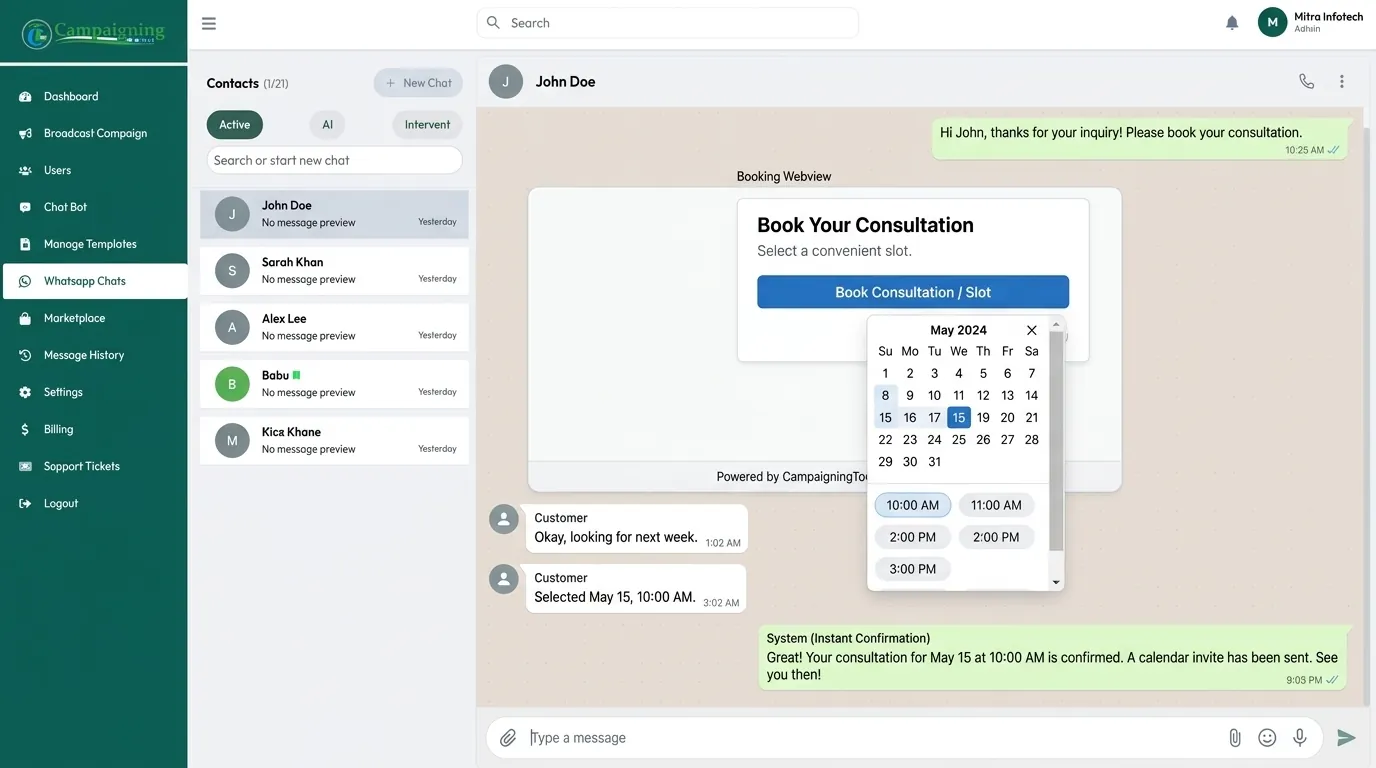
Customers can fill in a form, pick a date or complete a short survey on your own web page without leaving WhatsApp, on supported versions.
What a customer submits on the page can update the conversation state and be sent to your CRM or database via CampaigningTool webhooks and REST APIs.
Your web page opens in a mobile-optimized view on supported iOS and Android WhatsApp versions, fitting the smartphone display naturally.
Four straightforward steps from initial chat trigger to in-app submission and confirmation.
Your WhatsApp bot or team agent sends a message containing an action button or link pointing to your secured web page.
The customer taps the link, and the page opens inside WhatsApp on supported versions. Otherwise, it opens in their default browser.
The user selects an appointment date, browses custom product options, or completes a multi-field checkout.
The result is passed back to CampaigningTool via webhook, and your bot or AI agent sends a confirmation in chat.
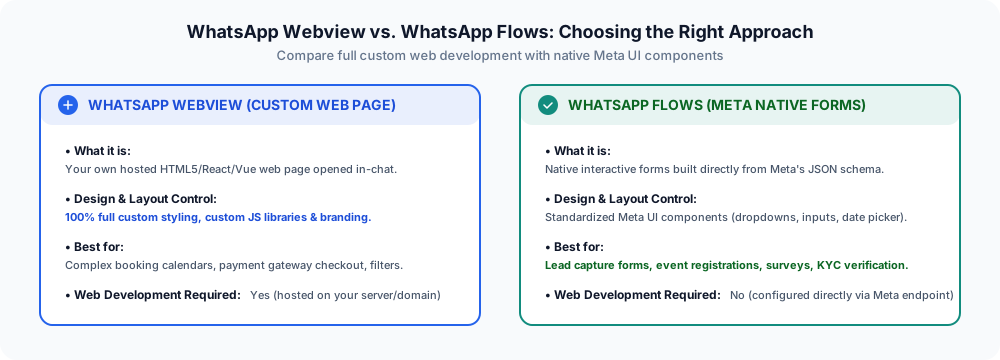
Understand how webviews differ from Meta's native form builder so you can choose the right tool for your user experience.
How businesses use in-app web views to streamline complex interactions.
Let customers pick appointment dates, timeslots, and specialists on an interactive calendar page.
Healthcare & Clinic WorkflowsOpen your payment gateway's secure checkout page (Razorpay, PayU, Stripe) for card, net banking, or wallet orders.
Explore WhatsApp PaymentsEnable shoppers to filter sizes, colors, vehicle models, or course bundles with dynamic web UI widgets.
E-Commerce WorkflowsCollect multi-field qualification details and requirements immediately after a user engages with an ad.
Click-to-WhatsApp AdsWebviews depend on Meta's platform rollout, supported WhatsApp client versions, and, according to some payment and provider documentation, a verified WhatsApp Business account.
If a customer's device or your account does not support the in-app webview container, the link gracefully opens in their default browser instead. Check Meta's current developer documentation, or talk to our team, to see whether your setup qualifies.
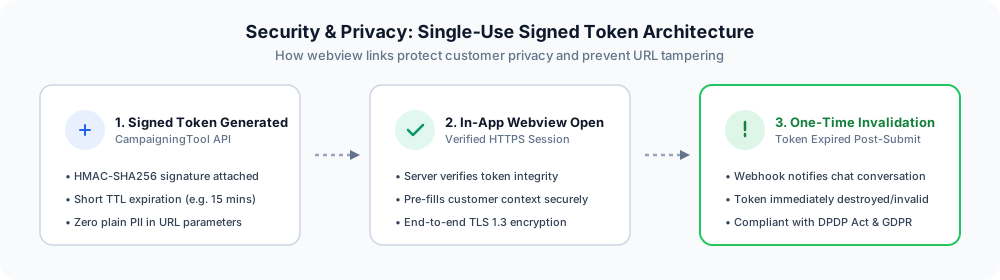
When opening web pages with customer context from WhatsApp:
Everything you need to know about in-app browser experiences, security, and WhatsApp Flows.
A WhatsApp webview opens a business's web page inside the WhatsApp conversation, instead of sending the customer to an external browser, so they can fill in a form, book or check out and return to the chat.
No. Flows are native forms built from Meta's components. A webview opens your own web page.
Webviews work on supported WhatsApp versions. On older versions the link opens in the external browser.
Some providers say embedded checkout needs a verified WhatsApp Business account, and an unverified account may open the page in an external browser. Check Meta's current requirements.
Booking pages, checkout, product selectors and forms, as web pages you host.
Yes, by opening your payment gateway's checkout page. See WhatsApp Payments.
It can be, if you use HTTPS, single-use expiring links and signed tokens, and avoid personal data in the link.
Yes, you can enable webview links and webhook syncing from your CampaigningTool console, or contact our team for implementation assistance.
See how a booking or checkout page can open inside WhatsApp. Book a demo, or start a 7-day free trial.