Browse ready-to-use WhatsApp message templates for marketing, order and appointment updates, and login codes. Each one is written to follow Meta's template guidelines. Copy the text, edit it for your business and submit it for Meta's approval, which Meta decides for each business.
Schedule your sequences with our WhatsApp scheduler and track engagement with WhatsApp link tracking.
Five straightforward steps to copy, customize, and submit templates for Meta review.
Select a template structure above that aligns with your campaign goal—whether promotional, transactional, or authentication.
Customize the message body for your brand tone and provide realistic sample data for every {{1}} parameter.
Assign the accurate category based on message intent to prevent Meta template rejection or reclassification.
Submit your template via CampaigningTool. Meta's automated AI and human reviewers evaluate the submission, typically within minutes to a few hours.
Once marked "APPROVED" in your dashboard, dispatch it via automated drip schedules, API triggers, or broadcasts to opted-in contacts.
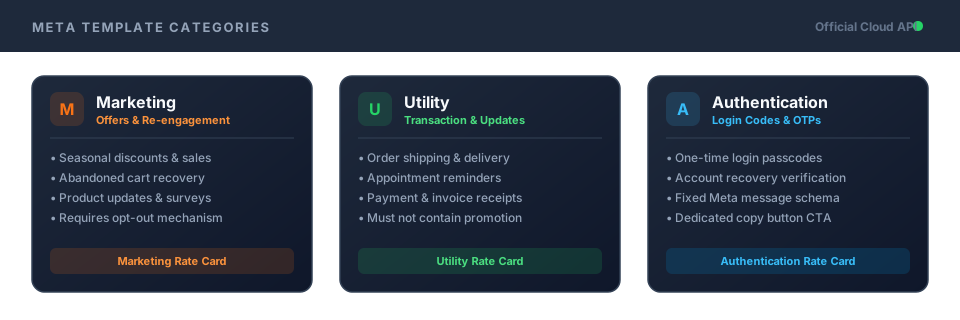
Understanding the difference between Marketing, Utility, and Authentication message tiers.
Covers promotional offers, product announcements, discount codes, newsletter digests, and abandoned cart nudges. Requires an opt-out line or button.
Messages regarding specific transactions or actions a customer already completed, such as order tracking, appointment alerts, and payment receipts.
One-time passcodes and login verification codes structured in Meta's fixed format with optional copy-code buttons.
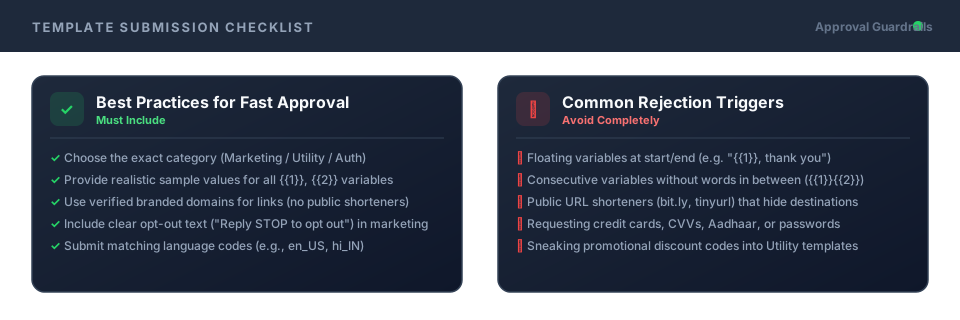
Follow these rules to prevent template rejections and ensure fast Meta approval.
Category & Language
Ensure the submitted language matches your template text exactly, and pick the matching intent category.
Variable Positioning
Do not place variables at the very beginning or end, and never place two variables adjacent like {{1}}{{2}}.
Branded Links
Never use public URL shorteners (bit.ly, tinyurl). Use link tracking with your own domain.
No Sensitive Requests
Never request bank card numbers, CVVs, national IDs, or account passwords in any WhatsApp message.
Explore specialized message copy and campaign sequences tailored to your sector.
E-Commerce & Retail
Cart recovery prompts, shipping tracking alerts, and replenishment reminders.
E-Commerce SolutionsReal Estate
Site visit confirmations, digital brochure downloads, and price drop notifications.
Real Estate SolutionsColleges & Universities
Admission deadline reminders, fee payment links, and campus exam schedules.
College SolutionsHealthcare & Clinics
Doctor appointment reminders, OPD queue tokens, and report readiness notices.
Healthcare SolutionsFinance & Insurance
EMI payment reminders, policy renewal alerts, and claim status updates.
Finance SolutionsEvents & Webinars
Webinar join links, 15-minute start reminders, and PDF certificates.
Event SolutionsSaaS & Tech Platforms
Trial onboarding tips, login verification codes, and server incident alerts.
SaaS & Tech SolutionsEverything you need to know about variables, categories, approval guidelines, and pricing.
No. Meta reviews every template for each business that submits it. These templates are written to follow Meta's guidelines, but approval isn't guaranteed.
Edit the template, add sample values for each variable, choose a category and submit it from your dashboard. Meta then reviews it, and review time varies.
Marketing templates promote, utility templates update a customer about something they did, and authentication templates send login codes. Meta decides the category and charges differently for each.
Common reasons are the wrong category, missing sample values, URL shorteners, sensitive-data requests and formatting problems. Edit it and resubmit. See our help center for rejection codes.
Yes. Change the wording and variables to suit your business before you submit.
It's a good idea for marketing templates, and you must only message customers who agreed to receive messages.
Authentication templates use a format set by Meta. Use Meta's format, and check Meta's current options.
Submitting and storing templates is included, while sending them is billed by Meta based on the category (marketing, utility, or authentication). See the pricing page for current plans.
Pick a template, edit it and submit it to Meta from your CampaigningTool dashboard. Try it free for 7 days.