Run WhatsApp for several departments, branches or brands on the official WhatsApp Business API. CampaigningTool gives large teams role-based access, a shared inbox, an API and webhooks for your own systems, and a named contact for onboarding and support. Send to customers who have agreed to hear from you, within the limits Meta sets.
Infrastructure, role controls, and integrations built for organizational scale.
Give owners, managers and agents different access, so each person sees only what they need. Ask us about single sign-on for your identity provider.
Send campaigns and alerts to large lists. Meta sets sending limits per number and raises them as your message quality stays good. See the limits section below.
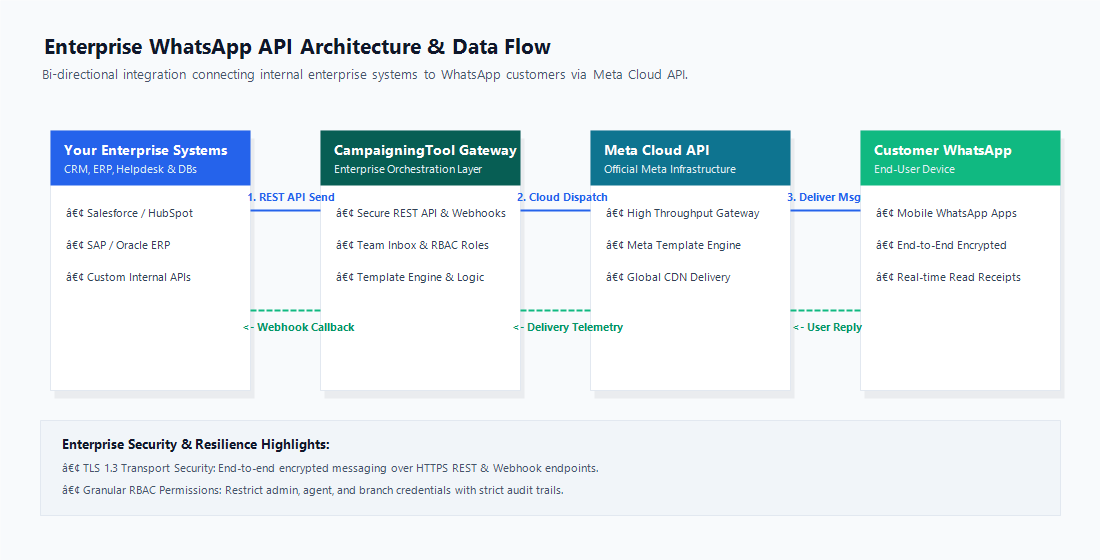
Use our REST API and webhooks to link WhatsApp to your CRM, ERP, helpdesk or order system.
Enterprise accounts get a dedicated specialist to guide onboarding, template approval and rollout, not only a generic ticket queue.
Sales, support, billing and branches reply from the team inbox, with each chat assigned to the right team.
See real-time sent, delivered, read and failed message telemetry, plus agent response times and operational audit trails.
Compare requirements to choose between our standard self-serve plans and custom Enterprise setups.
See the pricing page for standard plans.
Any system that can call a REST API or receive a webhook can connect to WhatsApp through CampaigningTool. That includes tools such as Salesforce, HubSpot, SAP, Oracle, Zendesk and Freshdesk. Some setups need work on your side or ours. Ask us which connections are ready to use today and which need building.
CRM Systems
For example Salesforce, HubSpot, or Zoho. Send a WhatsApp message when a lead changes pipeline stage, and log inbound customer replies directly on the contact record.
ERP and Order Systems
For example SAP, Oracle, or custom databases. Trigger automated invoice PDFs, dispatch alerts, payment receipts, and delivery updates directly from your core ledger.
Helpdesk & Ticketing
For example Zendesk, Freshdesk, or Jira. Open support tickets automatically from incoming WhatsApp conversations, or allow agents to reply directly from your existing helpdesk.
Your Own Proprietary Software
Use our comprehensive REST API to dispatch messages and webhooks to receive real-time delivery telemetry and user replies into your application.
*Product names belong to their respective owners. No formal partnership or endorsement is implied.
Secure, low-latency communication flow connecting your internal systems with WhatsApp users.
Step-by-Step Architecture Flow:
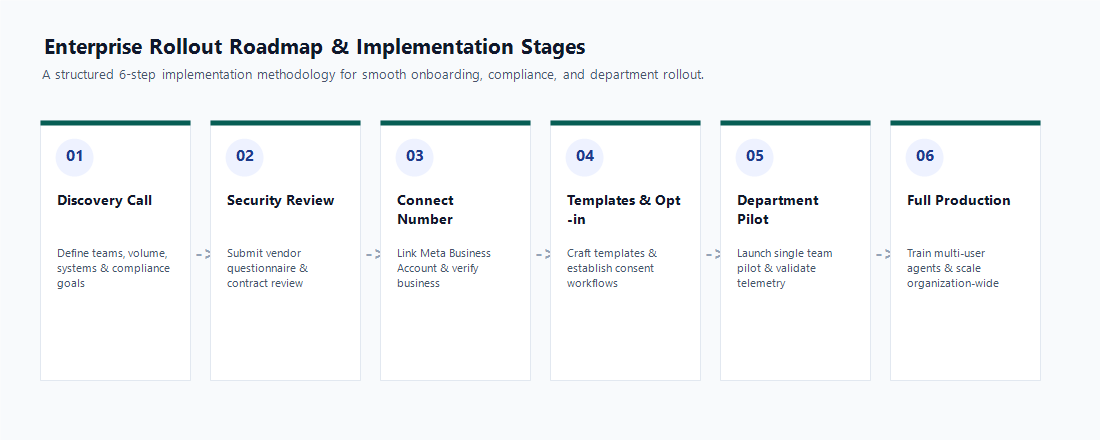
A proven 6-step framework to ensure security compliance, verified numbers, and smooth department adoption.
Tell us your departments, expected message volume, internal tech stack, and compliance requirements.
Send us your vendor questionnaire. We will answer it thoroughly and tell you plainly what we can and cannot provide.
Link your Meta Business account and WhatsApp numbers. Meta business verification is guided by our team.
Prepare message templates from our template library for Meta review, and audit your opt-in consent records.
Start with a single department or customer use case, monitor delivery telemetry and agent workflow, then expand.
Train agents on the multi-user inbox, configure granular RBAC permissions, and scale across all branches.
Understanding the official rules and throughput limits governing WhatsApp Business API numbers.
Messaging Limits: Meta limits how many unique users you can initiate conversations with in a rolling 24-hour window (Tier 1: 1k, Tier 2: 10k, Tier 3: 100k, Tier 4: Unlimited). The limit automatically increases as you send high-quality messages, and Meta Business Verification accelerates this upgrade.
Quality Rating: If recipients block or report your number, Meta lowers your quality rating and may restrict throughput. Maintain opt-in integrity and send only relevant, expected updates.
Approved Templates: Any business-initiated message outside of an active customer service window requires a pre-approved Meta template.
24-Hour Customer Service Window: When a customer messages your number, a 24-hour session opens where your team or AI agent can reply freely with custom text and media.
Throughput: Meta dictates the message-per-second sending rate on its Cloud API infrastructure. Always review Meta's current technical documentation before planning exceptionally large concurrent broadcasts.
Policy Changes: Meta updates WhatsApp Business policies and per-conversation pricing periodically. We notify enterprise clients in advance of upcoming changes.
If your security, IT or procurement team is reviewing vendors, these are fair questions to ask us and anyone else. We are happy to answer them in writing.
We enforce strict role-based access control (RBAC) and maintain comprehensive audit logs for team access.
Data is stored in secure cloud infrastructure with encrypted backups. Retention windows can be tailored to enterprise compliance requirements.
Our platform supports instant opt-out keywords (STOP), unsubscribe tagging, and right-to-be-forgotten data deletion requests.
You retain complete ownership of your phone number and contact database. Data can be exported and purged upon contract termination.
Enterprise agreements specify dedicated support hours, SLA response times, and named account manager details in writing.
We provide consent management mechanisms, data minimization controls, and lawful processing transparency as required under DPDP Act, 2023.
Built for organizations with complex departmental routing and heavy messaging traffic.
Multi-Branch Retail & E-Commerce
Automated order dispatch, multi-location store inventory alerts, and post-purchase support across retail networks.
Banks, NBFCs & Insurers
Payment reminders, KYC document collection, and claim status alerts with strict security controls.
Education Groups & Universities
Admission counseling, multi-campus student alerts, fee reminder notifications, and parent updates.
Logistics & Delivery Companies
Nationwide parcel dispatch alerts, live courier tracking links, OTP verification, and e-PODs.
Enterprise plans are tailored around your seat count, support agreements, and custom API integration requirements, so there is no single fixed price. Meta charges separately for template messages, and we pass those on at direct Meta rates with zero markup. You also pay 18% GST on our software subscription fees. Talk to our team for a custom quote, or see the pricing page for standard plans.
Common questions from security, IT and procurement teams.
It is the WhatsApp Business API set up for a large team: several departments or branches sharing numbers and inboxes, roles and permissions for agents, and your own systems connected through an API and webhooks. It runs on Meta's official WhatsApp Cloud API.
Enterprise plans are set up with our team. Seats, support terms, onboarding and integrations are agreed with you instead of picked from a table. See the pricing page for standard plans.
Meta sets the limit for each business and raises it as your message quality stays good. Business verification also helps. Meta decides how fast messages can be sent, so check its current documentation before planning very large sends.
Any system that can call a REST API or receive a webhook can connect through our API and webhooks. Some setups need work on your side or ours. Contact our team and we will tell you which connections are ready and which need building.
Tell us which identity provider you use during your demo, and we will confirm what is available for your plan.
Yes. Send it through our contact page and we will answer it in writing, including where we can't provide something. Ask for any certification documents you need.
Many companies use separate numbers for sales, support and billing, or for each brand. Ask us how many numbers your plan covers. Each number has its own limits and quality rating from Meta.
Enterprise customers can ask for support hours and response times to be agreed in writing. Parts of the service depend on Meta's WhatsApp platform, which we don't control, so no provider can promise it will never be down.
Connecting your account takes about 10 minutes. Meta's business verification, template approval and your own security review usually take longer, and they are the main timing factors. A pilot with one team is a good way to start.
It is set up around your seats, support terms and integrations, so there is no single price. Meta charges separately for template messages, and we pass those on at Meta's rate with no markup. Talk to our team for a quote.
Scale communication with core automation, broadcast, team inbox, and API infrastructure.
WhatsApp Business API
Official Meta Cloud API connection with high uptime and direct verification support. Learn More
REST API & Webhooks
Connect your internal apps, order dispatch triggers, and CRMs. Explore API
Multi-User Team Inbox
Route chats by department, assign conversations, and monitor agent reply times. Explore Inbox
WhatsApp AI Agent
Automate 24/7 lead qualification and support triage with custom business knowledge. Explore AI Agent
Bulk Broadcast Software
Send personalized template campaigns to segmented opted-in customer lists. Explore Broadcast
Subscription Plans
Compare standard tiers, feature limits, and conversation fees. See Pricing