CampaigningTool gives businesses one platform for WhatsApp marketing, from the first enquiry to the last review, so you can support every step of the customer journey on the official WhatsApp Business API. Capture leads with Click-to-WhatsApp ads and forms, follow up with scheduled campaigns and an AI agent, take payments in the chat with WhatsApp Payments, and ask customers for Google reviews. Every message goes to customers who opted in, using templates approved by Meta.
WhatsApp marketing means reaching customers on WhatsApp with messages they agreed to receive, such as offers, order updates, reminders and replies to their questions.
On the WhatsApp Business API, you send messages through approved templates, answer customers from a shared inbox and automate routine steps, so you can work at a scale the regular WhatsApp Business app isn't built for.
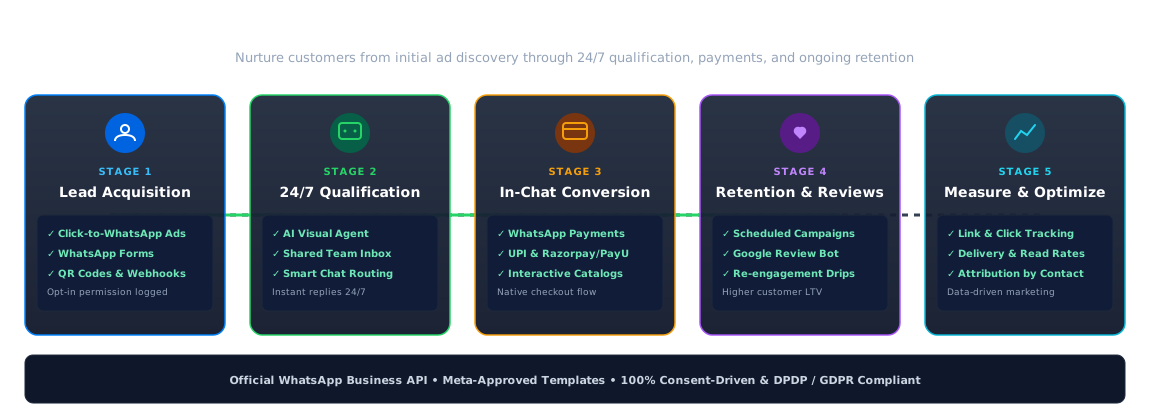
Engage prospects and customers with purpose-built tools across every touchpoint.
Capture leads from Click-to-WhatsApp ads, QR codes, website widgets, and WhatsApp forms.
An AI agent answers questions at any time of day, gathers preferences and passes serious buyers to your team in the shared inbox.
Share catalogs and offers, and take payment with WhatsApp Payments where your gateway supports it (including UPI, Razorpay, and PayU).
Send delivery updates and renewal reminders with scheduled campaigns, ask every customer for a genuine review with Google review automation, and re-engage customers who've gone quiet.
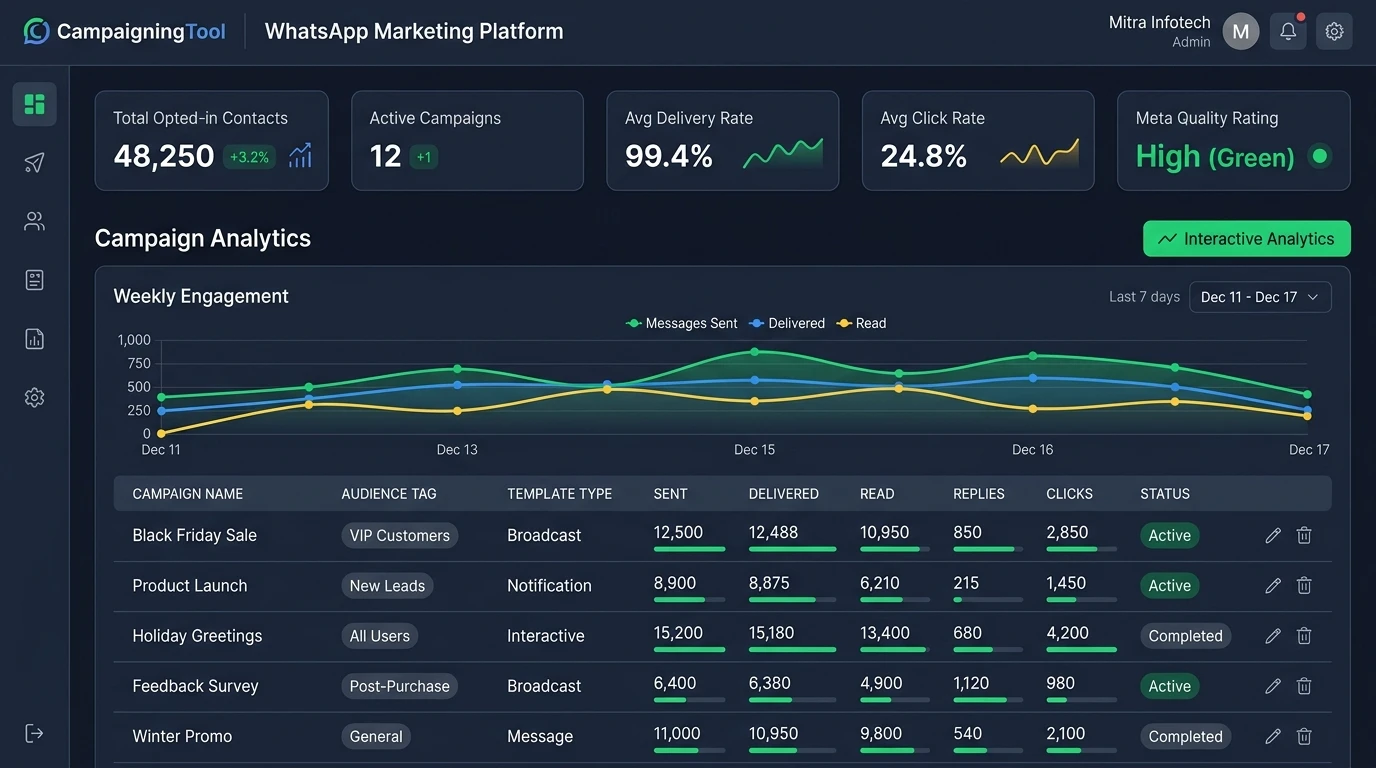
Use link and click tracking and campaign reports to see which messages bring customers, and build interactive web experiences with WhatsApp webview.
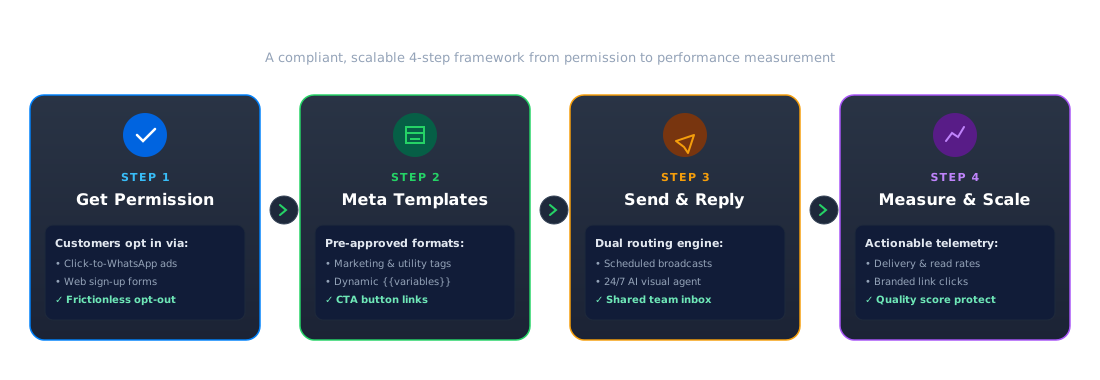
Deliver compliant, high-performing messaging campaigns in four straightforward steps.
Customers opt in, for example through a form, a chat they started, or a Click-to-WhatsApp ad.
Messages that start a conversation use message templates approved by Meta.
Run campaigns (including bulk WhatsApp broadcasts) and answer replies from one inbox, with an AI agent for routine questions.
Track delivery, replies, clicks and opt-outs, and adjust your next campaign for higher ROI.
Adhering to WhatsApp Business Messaging Policies protects your number's quality rating and ensures long-term marketing success.
Opt-In Permission
Only message customers who agreed, and make opting out easy (e.g. "Reply STOP to unsubscribe").
Templates & 24h Window
Outside 24 hours from a customer's last message, you need a pre-approved Meta template.
Quality and Limits
Poorly received messages lower your quality rating, and Meta applies messaging tier limits.
Sensitive Information
Don't ask customers for full card numbers, bank account numbers or government ID numbers in the chat.
Regulated Industries
Banks, insurers, and healthcare providers must comply with their respective regulatory standards as well.
For detailed guidelines, see WhatsApp API requirements.
Marketing campaigns are billed at Meta's marketing rate, while customer-care replies inside 24 hours are service messages.
You pay your CampaigningTool plan plus 18% GST on top, with Meta's charges passed on at cost.
Businesses of every size use WhatsApp marketing: online stores recover carts, colleges send fee reminders, clinics confirm appointments and dealerships book test drives. See the pages for e-commerce, colleges and car dealerships for examples.
Recover abandoned carts, send automated shipping alerts, and share dynamic product catalogs.
Qualify property buyers, share floor plan brochures, and schedule site visits automatically.
Guide prospective students through admission FAQs, collect documents, and send fee reminders.
Send OPD appointment confirmations, automated diagnostic report links, and pre-consultation reminders.
Dispatch EMI due-date reminders, policy renewal alerts, and collect KYC documents securely.
Launch your first broadcast campaign in four simple steps.
Review the requirements for official WhatsApp Business API access.
Connect your business phone number (see using an existing number).
Pick your first message templates and upload your opted-in audience.
Send your first campaign, monitor deliverability, and review real-time replies in your dashboard.
Answers to common questions about platform features, compliance, and getting started.
A WhatsApp marketing platform connects to the WhatsApp Business API so a business can capture leads, send approved template campaigns, answer customers with a team or AI agent, take payments and measure results, all with customer opt-in.
Yes, if you only message customers who agreed to receive messages, use Meta-approved templates for messages that start a conversation and follow Meta's Business Messaging Policy.
Yes. Opt-in can come from a form, a chat they started or a Click-to-WhatsApp ad, and every message should make it easy to opt out.
Marketing campaigns are billed at Meta's marketing rate, while customer-care replies inside 24 hours are service messages. See the pricing page for current plans.
The Business app suits small teams replying by hand, with limited broadcast lists. The API connects to software so you can automate, share an inbox and run campaigns within Meta's limits.
Often yes. See how to use your existing number.
Lead capture, follow-ups, appointment and payment reminders, order updates, offers and review requests.
Track delivery, replies, opt-outs and link clicks by campaign. See link and click tracking.
No, you can run campaigns directly from the visual dashboard. Developers can also connect custom systems and CRMs using our REST API.
Yes, the AI agent can answer common questions 24/7 and pass chats seamlessly to your team in the shared inbox.
Connect your WhatsApp Business API number, capture leads, send your first campaign and see what works. Try it free for 7 days.