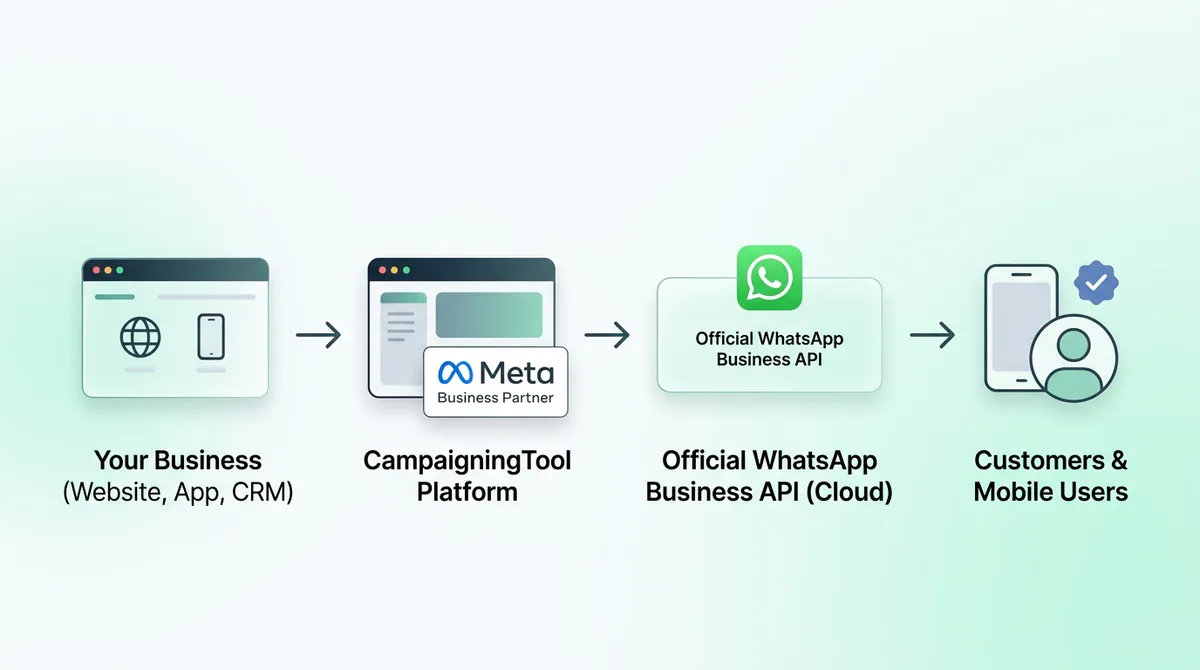
CampaigningTool is a WhatsApp Business API provider for businesses that want to message customers at scale. You connect your own number through Meta, send updates and offers to customers who opted in, reply from a shared inbox, add an AI agent, and connect your own software. Most businesses finish the Meta connection in about 10 minutes.
The WhatsApp Business API is the version of WhatsApp that Meta gives to companies that want to message customers at scale. It has no app of its own. You use it through a platform like CampaigningTool, which gives you a dashboard, a team inbox and tools for sending campaigns.
It's different from the free WhatsApp Business app. The app works for a small shop with one phone. The API is for businesses that have a team, many customers, or software that needs to send and receive messages on its own.
A WhatsApp Business API provider is a company that gives you access to the API through a dashboard, a team inbox and tools for campaigns. CampaigningTool is one. You keep your own number and your own customer list, and you pay a plan fee plus Meta's message charges.
How the free mobile app compares to the official enterprise API infrastructure.
| Feature | WhatsApp Business App | WhatsApp Business API |
|---|---|---|
| Best for | One owner, a small number of chats | Teams, campaigns and automation |
| Team access | Limited number of linked devices | Many agents on one number |
| Bulk messages | Broadcast lists with a contact limit | Thousands of opted-in contacts |
| Automation and AI | Basic quick replies | Chatbots, AI agent, webhooks |
| Connect to your software | No | Yes, through the API |
| Cost | Free | Platform plan plus Meta's message charges |
Scale marketing broadcasts, customer support, transactions, and developer integrations.
Send approved templates to opted-in contacts, convert social ad clicks with Click-to-WhatsApp ads, and track delivery in real time.
Bulk WhatsApp message broadcastThe agent replies from your FAQs and documents, collects lead details and hands the chat to your team when needed.
WhatsApp AI agentSales, support and accounts answer from the same number. Assign chats and see who handled what.
Multi-user inboxEnable WhatsApp Calling and use REST Api to send messages from your website, app or CRM, and receive delivery updates in real time.
API docs (Postman)Customers can pay with UPI or card from inside the conversation.
WhatsApp paymentsGet help applying for Meta's verified badge. Meta decides who receives it.
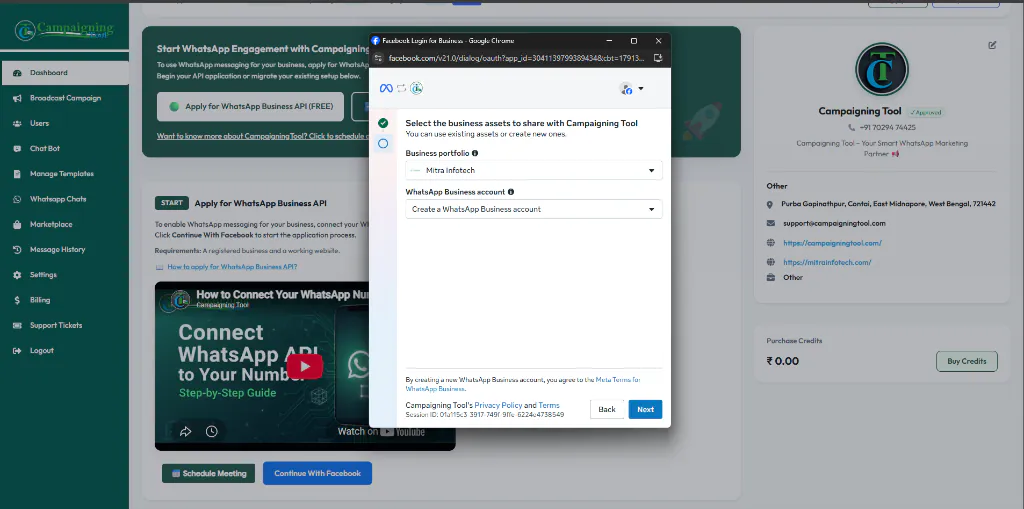
WhatsApp blue tick verificationGet connected to the official Meta Cloud API in 5 clear steps.
Sign up. No credit card is needed.
Log in with Facebook, pick your business, and add your WhatsApp number.
Meta sends a code by SMS or call to verify that you own it.
Upload contacts and send, or connect through the API.
Have these essentials ready before setting up your official WhatsApp number.
Clear, transparent pricing structure with zero hidden markups.
There are two parts to the cost:
Meta charges for messages by category (marketing, utility, authentication). We pass these on at Meta's rate with no markup. Meta changes its rates from time to time, so check Meta's current rate card before you plan a budget.
This is a monthly or yearly fee plus 18% GST, and it covers the dashboard, team inbox and tools. See the pricing page for current plans.
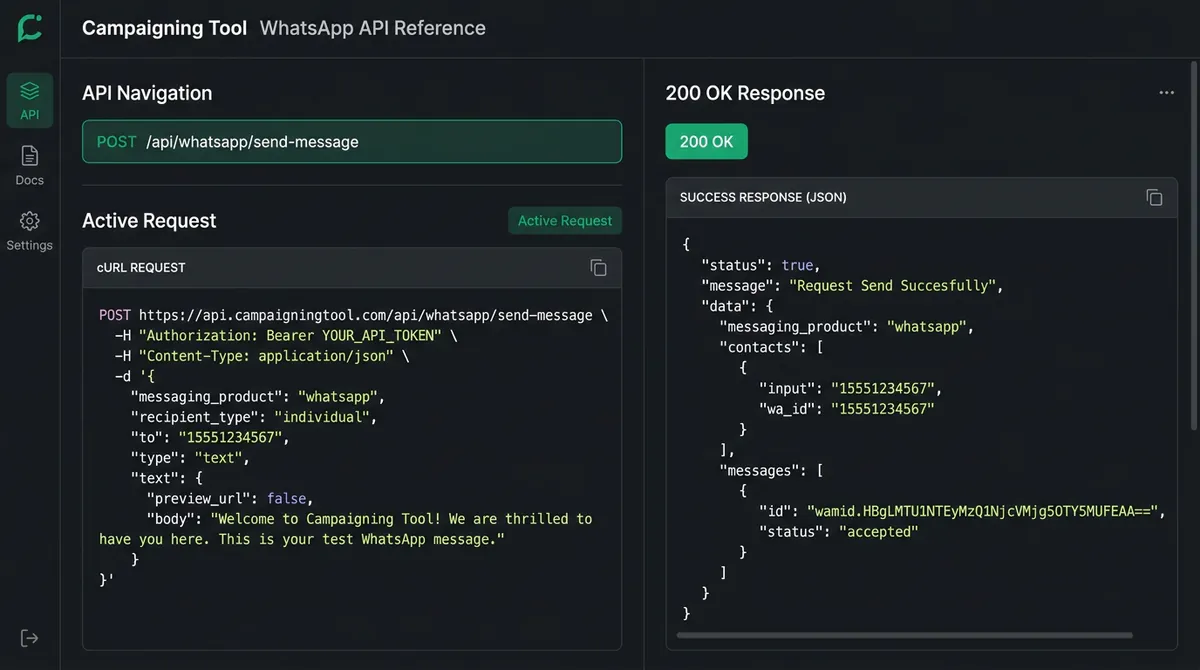
Send messages from your software and receive real-time webhooks using official REST endpoints.
Send messages from your own system with our REST API (POST /api/whatsapp/send-message), authenticate securely via Bearer Tokens, and receive delivery status, read receipts, and incoming customer messages through webhooks. Everything you need to start is in our Postman documentation. If you want a person to look at your setup, contact our team.
Colleges send fee reminders and admission updates. Online stores send order updates and cart reminders. Clinics send appointment and report notices. Pick your industry to see examples:
Admission updates, fee links, and exam notices on WhatsApp.
Colleges & UniversitiesRecover abandoned carts, send dispatch alerts and catalog items.
E-Commerce SolutionsAppointment booking reminders and automated lab report delivery.
Healthcare SolutionsShare project brochures, location maps, and schedule site visits.
Real Estate SolutionsPolicy premium alerts, KYC document submission, and statements.
Finance & InsuranceEverything you need to know about API pricing, accounts, sending limits, and setup.
No. Meta charges for most business messages, and the platform you use has its own plan. Replies to customers inside Meta's service window have been free, but Meta can change this, so check its current rate card.
The app is for a small business using one phone. The API is for teams, bulk messaging and automation. You use it through a platform like CampaigningTool.
Often yes, but the number must meet Meta's requirements. Read our guide to use your existing number on the WhatsApp API.
The account connection takes about 10 minutes. Meta's business verification and template approval take extra time and are decided by Meta.
You can start without it, but your sending limits will be low. Verifying your business raises them.
Yes, to people who agreed to hear from you, using templates approved by Meta. See our bulk WhatsApp message broadcast page.
Yes. The team inbox lets many agents answer from the same number.
No. Meta decides who gets it. We can help you apply.
Ask each provider four things: what you pay besides Meta's charges, whether they add a markup to Meta's message fees, how many agents your plan includes, and what happens to your data and number if you leave. Then test the dashboard in a free trial before you commit. See our pricing page for how we answer those questions.
Connect your business with our full suite of official WhatsApp messaging tools.
Send marketing and alert broadcasts to thousands of opted-in customers.
Bulk BroadcastLet sales, support, and billing teams answer from one single number.
Team Inbox100+ Meta-approved pre-designed message templates ready to deploy.
Template LibraryHigh-volume messaging, custom RBAC permissions, and a named account manager.
Enterprise WhatsApp API